Week 08
Building a Backend
We're going to build a backend using Node.js and Express.js. First we need to make sure we have node and npm (Node Package Manager) installed. Try the following commands in your terminal:
node -v
npm -v
If you get any errors, it means you need to install them first. Head to https://nodejs.org/en/download to install both node and npm for your operating system.
Initializing a Node Project
Our backend will be a Node.js project, so we need to initialize it first. Open your terminal and run:
npm init
You can skip all the questions by pressing Enter. This will create a Node.js project where the entry file will be index.js which we need to create later.
Express.js
Express is a minimal and flexible Node.js web application framework to create backends. To use it, we first need to install it using npm. Run the following command from the directory that contains your Node.js project:
npm install express
First API
Create a index.js file and add the following code to it.
const express = require('express')
const app = express()
const port = 3000

app.get('/', (req, res) => {
  res.send('Hello World!')
})

app.listen(port, () => {
  console.log(`Example app listening on port ${port}`)
})
To execute the code, run the following command from the same directory (folder) as the index.js file:
node index.js
You should see the following message showing up in the terminal:
Example app listening on port 3000
That means the backend app is running on the port 3000, just like our previous backend apps ran on the port 8080.
What We're Building
We're building a simple phone book using Express.js as the backend. It has two pages: one for adding a new contact and one for listing all the contacts, like the following:
Add Contact:
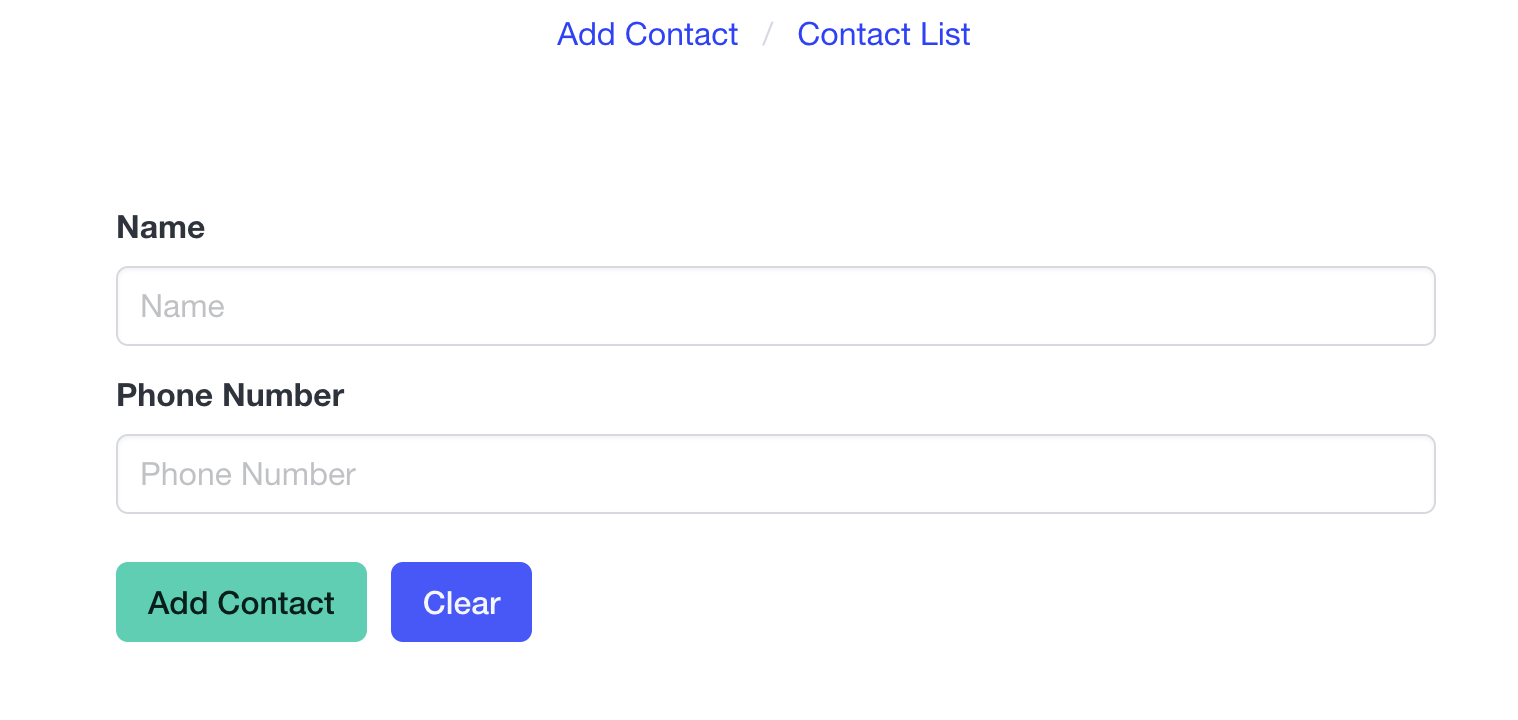
List Contacts:

What We Need
We need node and npm installed. Follow the instructions on the website to install them if you haven't already.
We also need the following npm packages installed after creating a Node project:
express: for building our routescors: for making sure that we don't run into CORS issues
Here's the HTML starter code for the two pages (built using Bulma).
index.html
<!DOCTYPE html>
<html lang="en">

<head>
    <meta charset="UTF-8" />
    <meta name="viewport" content="width=device-width, initial-scale=1.0" />
    <title>Add Contact</title>
    <link rel="stylesheet" href="bulma.min.css" />
    <script src="new_contact.js" defer></script>
</head>

<body>
    <div class="container">
        <nav class="breadcrumb is-centered mt-2" aria-label="breadcrumbs">
            <ul>
                <li><a href="index.html">Add Contact</a></li>
                <li><a href="contacts.html">Contact List</a></li>
            </ul>
        </nav>
        <div class="columns">
            <div class="column mt-6 is-half is-offset-one-quarter">
                <div class="notification is-primary is-hidden success-notif">
                    <button class="delete"></button>
                    Added successfully!
                </div>
                <div class="notification is-danger is-hidden fail-notif">
                    <button class="delete"></button>
                    Something went wrong!
                </div>
                <form action="" id="form">
                    <div class="field">
                        <label class="label">Name</label>
                        <div class="control">
                            <input class="input" type="text" placeholder="Name" name="name" autocomplete="off"
                                required />
                        </div>
                    </div>

                    <div class="field">
                        <label class="label">Phone Number</label>
                        <div class="control">
                            <input class="input" type="number" placeholder="Phone Number" name="phone_number"
                                required />
                        </div>
                    </div>

                    <div class="field is-grouped mt-5">
                        <div class="control">
                            <button id="submit" class="button is-primary">Add Contact</button>
                        </div>
                        <div class="control">
                            <button id="reset-form" class="button is-link">Clear</button>
                        </div>
                    </div>
                </form>
            </div>
        </div>
    </div>
</body>

</html>
contacts.html
<!DOCTYPE html>
<html lang="en">

<head>
    <meta charset="UTF-8" />
    <meta name="viewport" content="width=device-width, initial-scale=1.0" />
    <title>Contact List</title>
    <link rel="stylesheet" href="bulma.min.css" />
    <script src="contacts.js" defer></script>
</head>

<body>
    <div class="container">
        <nav class="breadcrumb is-centered mt-2" aria-label="breadcrumbs">
            <ul>
                <li><a href="index.html">Add Contact</a></li>
                <li><a href="contacts.html">Contact List</a></li>
            </ul>
        </nav>
        <br>

        <div id="section-container">
            <div class="fixed-grid has-4-cols">
                <div class="grid">
                    <div class="cell">
                        <div class="card">
                            <div class="card-content">
                                <div class="content">
                                    <div class="title">Masoud</div>
                                    <p class="subtitle">4035555555</p>
                                </div>
                            </div>
                        </div>
                    </div>
                    <div class="cell">
                        <div class="card">
                            <div class="card-content">
                                <div class="content">
                                    <div class="title">Batman</div>
                                    <p class="subtitle">4035555556</p>
                                </div>
                            </div>
                        </div>
                    </div>
                </div>
            </div>
        </div>
    </div>
</body>

</html>